The Fun, Honest Truth About Digital Auto Painter (DAP)
by Charles David
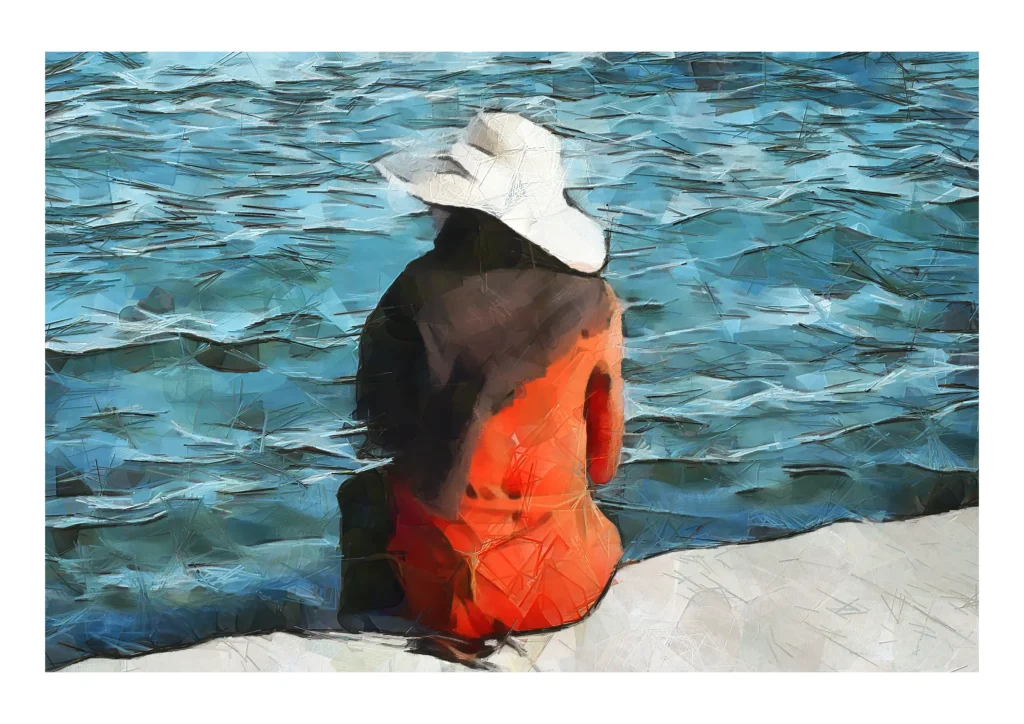
Every so often I get asked about how I create my digital paintings — and judging by my analytics, a lot of you are curious. So today I’m lifting the lid on one of the tools I use: Dynamic Auto Painter, or DAP if you’re on nickname terms.
Now, if you read the marketing blurb, you’d think DAP is basically a magic wand. “Turn your photos into masterpieces like Van Gogh or Monet!” Yes… wouldn’t that be lovely. Press a button, boom — instant gallery piece. Sadly, reality is a bit less Disney.
Here’s the truth: DAP is only as good as the person driving it. It’s a beast — hundreds of presets, endless sliders, pre‑processing, post‑processing, knobs, dials, levers… it’s like flying a 1950s aircraft. If you think you’re going to click one preset and suddenly produce a Sargent or a Pino, you’re in for a very sobering afternoon.
But — and this is the important bit — in the right hands, it’s incredible.
To use DAP properly, you need to understand both the tech and the art: brush behaviour, light, shadow, colour theory, composition… all the stuff real painters obsess over. Honestly, having painted in oils and watercolour, I can tell you: traditional painting is easier in many ways. DAP demands supervision. It wants you involved. If you leave it alone to “do its thing”, you’ll get something… but not something you’ll want to frame.
I’ve been using it for nearly three years now — and by “using”, I mean interacting with it, painting with it, nudging it along like a slightly stubborn apprentice. And with that approach, I’ve created some of my favourite pieces: The Colours of Liverpool, Autumn Leaves, Searching for Sunlight… all born from this quirky, brilliant bit of software.
So should you buy it? Well, that depends. If you’re willing to put in the effort — to learn, experiment, fail, tweak, and try again — then yes, it’s a fantastic tool. If you want a one‑click masterpiece generator… maybe not.
Because with DAP, the old rule still applies: Rubbish in, rubbish out. Start with a perfect base image. Choose or build the right preset. Decide whether you want impressionistic chaos or something more realistic. Think about colour, brush direction, texture. And above all — stay involved during processing. The difference between “meh” and “wow” is usually the artist, not the software.
In short: Dynamic Auto Painter is an amazing creative partner — but only if you’re prepared to actually partner with it.